
Do you use Google Calendar? If you answered “no”, well, are you sure that you don’t use Google Calendar? Because even if you don’t use Google Calendar directly, if you use a calendar on the iPhone, or on an Android phone, you may well be using Google Calendar on the back end without even thinking about it. The same is true if you “share” your calendar from your Mac. And here’s the thing, your calendar on Google may be set to “public” view by default. Meaning that anyone can read your calendar. And it will turn up in public Google search results.
It seems like only just a few days ago that we were talking about what Google’s new privacy policies mean for you. And for them.
Here’s how to check whether your Google calendar is available to anyone on the Internet.
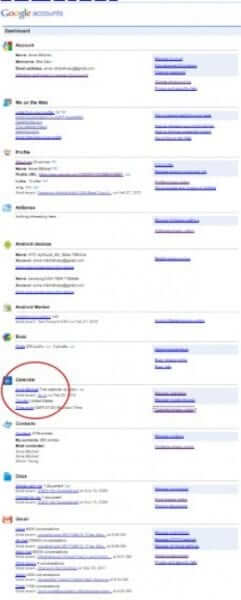
First, to find your calendar, go to the Google dashboard (make sure that you are logged in to Google). You will find the Calendar section about half-way down the (very long) page:
The Internet Patrol is completely free, and reader-supported. Your tips via CashApp, Venmo, or Paypal are appreciated! Receipts will come from ISIPP.
CashApp us

Venmo us

Paypal us

Let’s take a closer look at that listing:
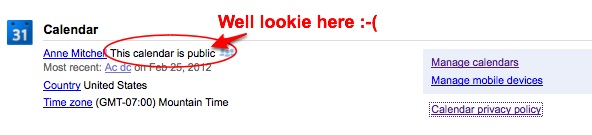
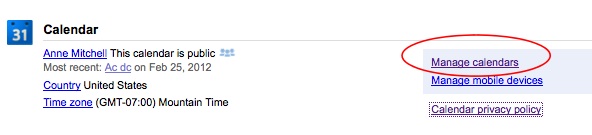
So, click on the link that says “Manage calendars”:
Now you will see this page – click on the “Shared: edit settings” link under “Sharing”:
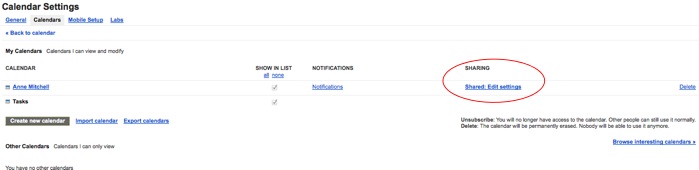
Pay close attention to this next screen!
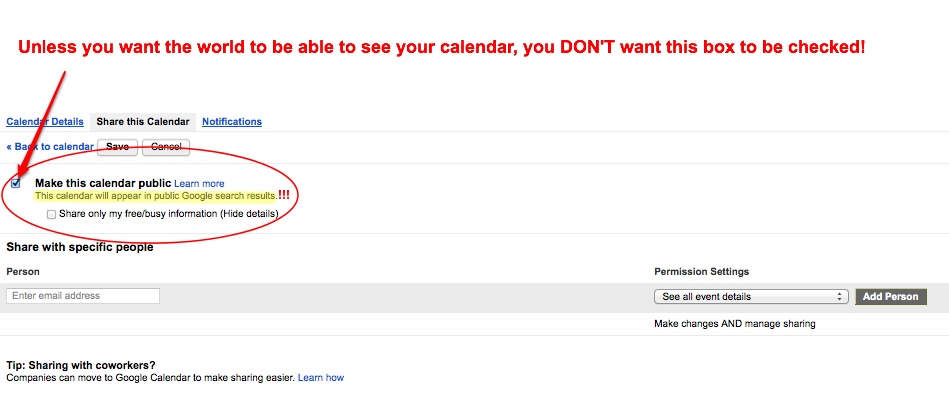
Ok, so to undo this invasion of privacy, you have to do two things:
First, uncheck the box next to “Make this calendar public”, and then be sure to click “Save”! Any other action which involves refreshing the page, clicking away from the page, or otherwise leaving the page, will revert the check box back to being checked:
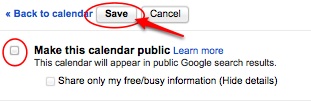
There, now your Google calendar is nice and private. But, shouldn’t it have been to start with?
You can find your Google dashboard here.
The Internet Patrol is completely free, and reader-supported. Your tips via CashApp, Venmo, or Paypal are appreciated! Receipts will come from ISIPP.
CashApp us
Venmo us
Paypal us






