
With the recent Facebook poking arrest, a lot of people want to know what it means to “poke” someone on Facebook.
In addition to wondering “what is a Facebook poke”, a lot of people wonder “When you poke someone on Facebook does anyone else see it?” – the answer to that is “no” – only the person you’ve poked can see that you’ve poked them. In that sense, perhaps the person behind the Facebook poking arrest considered it more of a goosing than a poke.
So how do you know if you’ve been poked on Facebook?
It will show up on your Facebook home page (and only on your Facebook home page, nowhere else – because that section of each page other than your home page is reserved for lots and lots of advertising).
On your home page, in the far right column, somewhere around half-way down the page, is a section called “Pokes”.
The Internet Patrol is completely free, and reader-supported. Your tips via CashApp, Venmo, or Paypal are appreciated! Receipts will come from ISIPP.
CashApp us

Venmo us

Paypal us

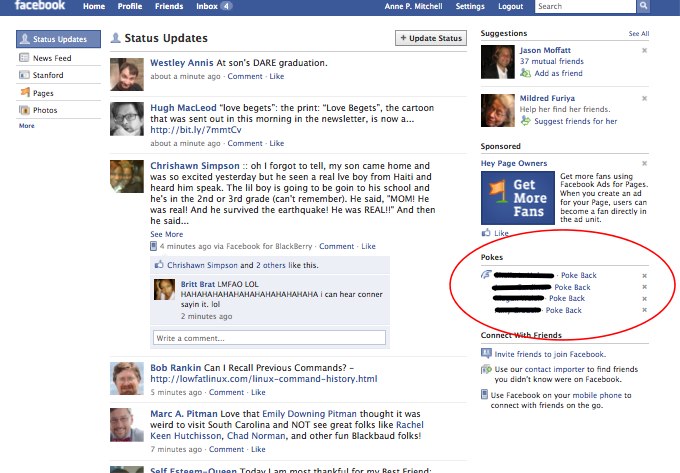
If you have been poked by someone, you will see their name, and a link to poke them back, listed in the “Pokes” section:

Once you have poked them back, their name is cleared from your “Pokes” area. If you have no pending Pokes, your Pokes area will disappear, meaning that if there is no Pokes area on your homepage, nobody has poked you.
If you want to initiate a poke yourself, you need only go to your Facebook friend’s profile page, and you will find a link to poke them directly under their profile picture:

Interestingly, and depending on an individual’s privacy settings, you can also sometimes poke people who are not your friends!
Equally interesting, and also apparently according to privacy settings, sometimes even if someone has poked you, and you are poking them back, you will get a privacy warning:
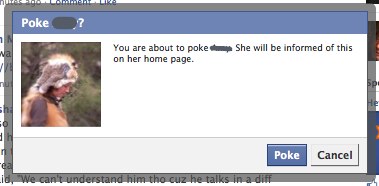
So that’s everything you need to know about Facebook pokes! Now, go forth and poke someone!
The Internet Patrol is completely free, and reader-supported. Your tips via CashApp, Venmo, or Paypal are appreciated! Receipts will come from ISIPP.
CashApp us
Venmo us
Paypal us







How do I get a friend back to pokes when he isn’t on my pokes list?
“poke” is basically someone trying to get your attentionIt’s one of the meaningless features that are used just to annoy someone. If you poke someone not in your network and they poke back. You can view their profile even if your not their friend! A poke is when you allow someone to see your facebook page for 3 days, so they can know who you are and hopefully add you as a friend.
Thanks
_________
Prep Station
Hi. If you poke someone that is not your friend, can other people see that you poked that person?