
Now this is new! If you have a Facebook account, searching for your name in Google will turn up not only a link to your Facebook page, but includes a list of your friends, as well! And that’s even if your privacy settings on Facebook are set to disallow public access, such as the “only My Networks and Friends can see my profile and personal info” settings.
Now, it’s true that if someone who isn’t your Facebook friend is on the Facebook site, and searches for you, they will be offered a link to see who all your Facebook friends are, even if you have your privacy settings set to disallow public viewing of your profile.
But now people don’t even have to go to the site. In fact, by Googling you, they eliminate several steps they would have to take on Facebook to find you and see who some of your friends are. On Facebook, they first have to log into Facebook, then they have to search for the name, then they see a listing like this:
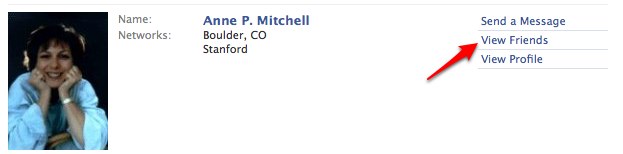
and then they have to click on the “view friends” link, before ever seeing the name of even a single one of your friends.
Now, take a look of the new results for Googling my name:
The Internet Patrol is completely free, and reader-supported. Your tips via CashApp, Venmo, or Paypal are appreciated! Receipts will come from ISIPP.
CashApp us

Venmo us

Paypal us


Now look at my personal privacy settings on Facebook:
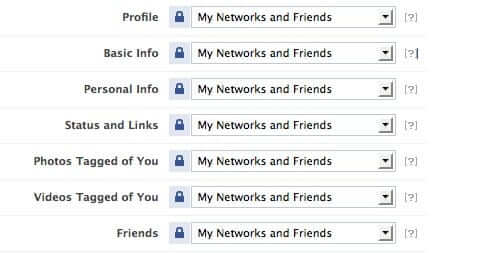
So, why are the Google results showing a list of my Facebook friends?
One might expect that Google results might show friends if the settings were like this:
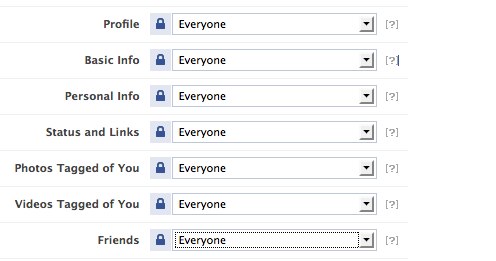
..but they aren’t.
So what’s the deal?
Speaking of deals, is this a deal (perhaps unwritten) between Facebook and Google? Did Google intentionally tweak their search algorithm to include the Facebook “friends” information? Does Facebook know? Did they help them do it?
And how do you feel about it? Are you doing to do anything differently now that you know?
UPDATE: We have since learned that there is now a way to keep Google from doing this, via your “search privacy” settings in Facebook. So the answer to “are you going to do anything differently now that you know” can include this:
1. Log into your Facebook account.
2. Go to your “settings” page
3. Click on “manage” Privacy
4. Click on “Search”
5. Review and edit the options (which of course are all pre-checked):
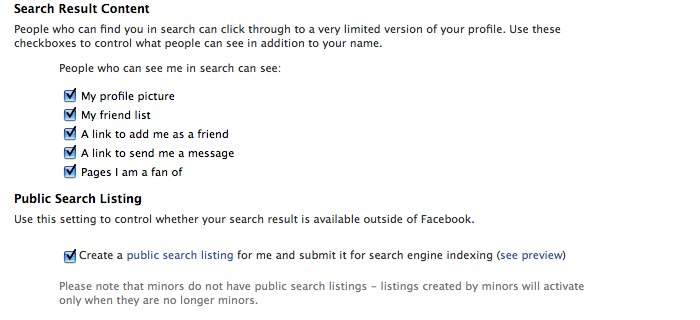
Facebook explains:
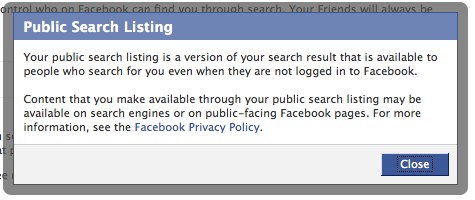
The Internet Patrol is completely free, and reader-supported. Your tips via CashApp, Venmo, or Paypal are appreciated! Receipts will come from ISIPP.
CashApp us
Venmo us
Paypal us







MY ACCOUNT IS LOCKED DOWN AND PRIVACY ISSUES ARE ADHERED TO. HOWEVER, ALL OF MY LOCKED DOWN INFO APPEARS ON INTERNET SEARCHES ON MY NAME (NOT THE NAME I USE ON FB!! VIRTUALLY EVERYTHING – EMAIL ACCOUNT: LOCKED, PRIVATE ROOMS, ALL MESSAGES, ALL MY PHOTOS THAT ARE LOCKED TO “ME” ONLY – I CANNOT FIND ANYONE WHO KNOWS WHAT IS HAPPENING. i HAVE TO PULL DOWN MY ACCOUNT.
Not sure if I’m missing something here, but… I decided to search for your name myself, and sure enough up popped the link in Google with the list of some of your “friends”. But then I clicked on the link itself, which took me to Facebook… and Facebook presented me with a signup page (http://www.facebook.com/AnnePMitchell?_fb_noscript=1) showing your photo *and* the photos (and names) of 8 (more?) of your friends.
Given your privacy settings I assumed that should *not* be happening… or else, as I already mentioned, I’m “missing” something :-)
Hi Sarah!..yep, just as you were leaving the content, we were updating the article, with screen shots. :-) Thanks!
In typical Facebook fashion, the option for keeping your friends list off Google is in a completely different tab in the privacy settings. You can go to Settings > Privacy > Search and uncheck the box under “Public Search Listing” that says, “Create a public search listing for me and submit it for search engine indexing.” Should do the trick.
David – our theory (our HOPE!) is that it won’t do it *if* you have your privacy settings ratcheted all the way up to “only friends” – but there is no way to *quickly* test that, unless someone wants to volunteer that’s how their settings are and let us Google them. If we change our settings to “only friends” it could still take days (or weeks) for the change to propogate and show up in Google search results.
But that said, with a setting of “only my networks and friends”, one would think that the only people who could see that information might be, well, your network and friends. *Especially* when the “control who sees your friends” setting is set to “only my networks and friends.” I guess that Google is one of your friends. ;-)
Interesting. Testing random folks I know on Facebook, I’m only seeing those results about 20% of the time.