
With recent changes to Facebook, it turns out that Facebook is now choosing which friends’ news feeds to show you in the live feed view, and, essentially, blocking all the rest! Meaning that all of your other friends are blocked from being shown in your live feed update! Here’s how to undo that and get all of your Facebook friends’ live feed news back.
First, go to your Facebook home page, and at the top of your Facebook home page, next to where it says “News Feed”, click on “Most Recent” if you aren’t already displaying that view:

Next, scroll aaaaall the way down to the bottom, where, above the legal links, you will see a small link on the right that says “edit options”:

The Internet Patrol is completely free, and reader-supported. Your tips via CashApp, Venmo, or Paypal are appreciated! Receipts will come from ISIPP.
CashApp us

Venmo us

Paypal us

It’s important that you be in the “Most Recent” view, because in the “Top News” view you will still see the “Edit Options” link, but it will be for different options.
Clicking the “Edit Options” link reveals a pop-up which explains that Facebook arbitrarily chose the friends who are currently in your live feed “based on who Facebook thinks you want to hear from most.” (Facebook chooses 250 friend for you – so if you have fewer than 250 friends, this won’t affect you, but if you have more than 250, all of the friends except the 250 that Facebook chose for you are being blocked from displaying on your home page!)
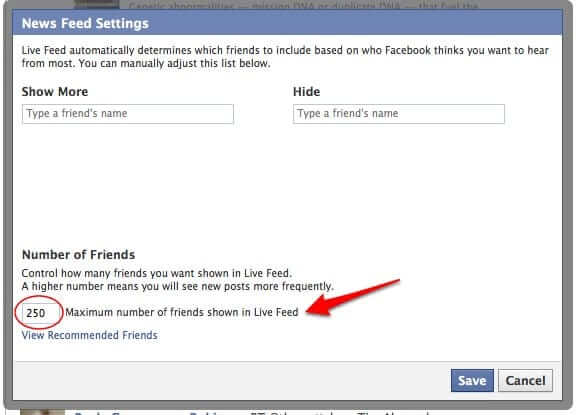
Further down on the pop-up is a place to type in the maximum number of friends’ live feeds that you want to see. You can replace Facebook’s default “250” with any number up to 5000 (the Facebook limit). So, assuming that you want to see what all of your friends are up to, type “5000” into that box, and then hit “Save”.
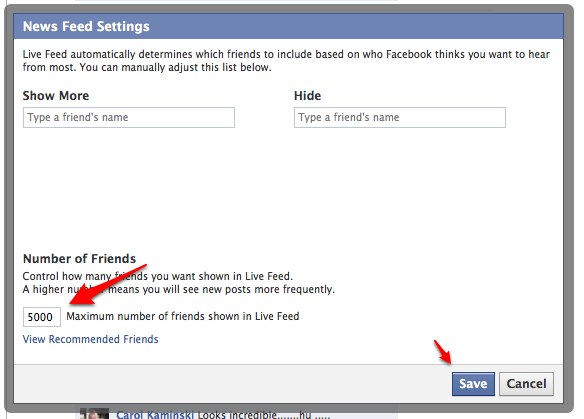
There you go! Now you have all your friends back!
This tip was originally sent to us by Internet Patrol reader Jim B. – thank you, Jim!
The Internet Patrol is completely free, and reader-supported. Your tips via CashApp, Venmo, or Paypal are appreciated! Receipts will come from ISIPP.
CashApp us
Venmo us
Paypal us







How do you get your “now friends” with to appear repeatedly. I keep getting the same notification from a competitor repeatedly. I’d like to ensure they get the same?