
Some people may already know this, but there are plenty of people who don’t. Forget your fancy Mac MP3 players!
Did you know that you can play an MP3 on the fly on your Mac without using or loading any separate Mac MP3 players, and without even loading or using iTunes?
And it’s as easy as locating the file you want to listen to in your finder window! It’s which view you choose in your finder window which makes the difference.
When you are using Finder, you have the choice of three views: as Icons, as List, and as Columns. Here is how the buttons look to choose those views:

The Internet Patrol is completely free, and reader-supported. Your tips via CashApp, Venmo, or Paypal are appreciated! Receipts will come from ISIPP.
CashApp us

Venmo us

Paypal us

Now, the one that you see highlighted in blue – the right-most one – allows you to view your files in columns which get increasingly narrow in their scope. The left-most column is the “big picture” – think of it as a satellite photo of the earth. The middle columns get increasingly granular (folders, folder contents, directory contents, file names, etc.). Think of those columns as showing you countries on the earth, then cities, then streets. The right-most column is information about a file you have selected. Think of it as showing you the contents of a house.
When the file you have selected is an MP3 or other audio file, that right-most column gives you a whole lot of information about the file, along with an inline player, like this!:
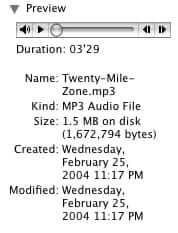
Just click on the audio controls to play, pause, rewind or fast-forward your song (and you can control the volume from there too!).
The Internet Patrol is completely free, and reader-supported. Your tips via CashApp, Venmo, or Paypal are appreciated! Receipts will come from ISIPP.
CashApp us
Venmo us
Paypal us







YOU ARE AWESOME! I disn’t know this and really had to dig to find your post!
Fantastic, thank you, it’s so easy and it works!! My Mac doesn’t show the player the same way, it’s just a square black box with a pair of notes in it, but click on the box and the play/stop buttons appear… and it plays :o)
As far as I know, it should be possible for every tcp/ip compatible machine in the world to play mp3 because mp3 is an OSI layer 6 protocol.
my view was slightly different, i just needed to click on the big black square with the music notes inside and it plays! Really useful – thank you.